
A workbook is a lot more than a stack of handouts! What to consider when designing professional development materials that deliver real results.

This post was first published on my Medium blog—follow me there for the most up-to-date entries!
We’ve all handed out pages to professional development course participants — summaries, diagrams, or tip sheets — and called them a “workbook.” But a workbook, done right, is something very different. It’s not a packet of handouts, and it’s not just a note-taking guide. This workbook vs handouts confusion runs deep.
When I first set out to write a lengthy workbook nearly a decade ago, I asked myself what made it different — and why that difference mattered. Now, as I build a substantial workbook for a client, I’m reminded how that understanding reshaped how I design, deliver, and think about a workbook — and how directly it influences the extent to which learners connect, engage, and retain what you teach.
What a workbook really does
A true workbook helps learners move from reading to doing, from exposure to evidence, from information to transformation.
- It helps learners process what they’ve heard or seen.
- It invites them to apply a concept, not just recall it.
- It allows them to record their progress — proof of competence or confidence gained.
A workbook’s purpose isn’t to hold content, but to create change.
How workbooks differ from handouts
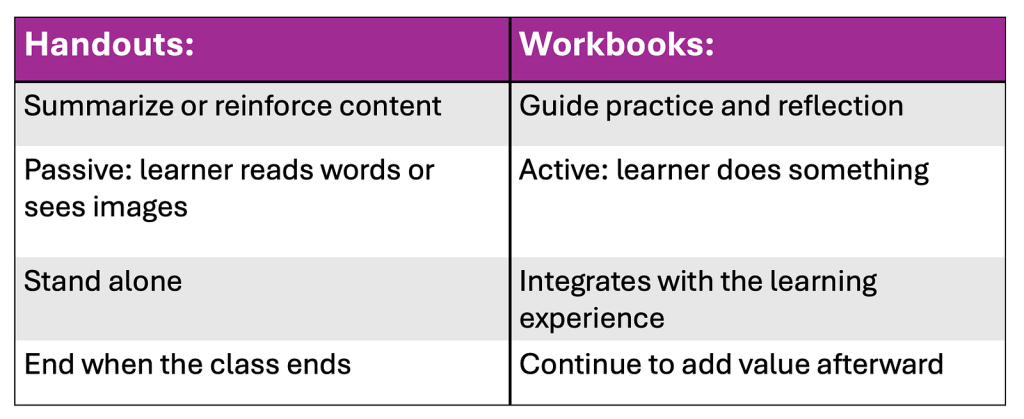
Handouts:
- Summarize or reinforce content
- Passive: learner reads words or sees images
- Stand alone
- End when the class ends
Workbooks:
- Guide practice and reflection
- Active: learner does something
- Integrates with the learning experience
- Continue to add value afterward
You can avoid the workbook vs handouts confusion by remembering two points:
- Handouts say, “Here’s the information.”
- Workbooks say, “Here’s how to use it.”
Three outcomes a good workbook delivers
- Learning: reinforces understanding through repetition and retrieval.
- Doing: guides practice, application, or reflection — whatever “use it” looks like for that topic.
- Proving: offers evidence of progress, especially valuable in certification or continuing-education settings.
To me, the most critical feature of any workbook is the knowledge check. If you’re like me, you’ve attended courses where the “knowledge check” was a True/False slide that asked you to click a radio button. Seriously? Does that accomplish learning, doing, or proving anything? Of course not. Yet, many who create a course call this “engagement.” It isn’t. Not even close.
There are many types of knowledge checks (more on that in a later post), but clicking alone doesn’t reinforce, apply, or prove a thing. The workbook offers something more:
- Learning: Writing by hand lights up parts of the brain that promote retention.
- Doing: Workbook prompts push learners to make decisions, solve problems, or reflect.
- Proving: A written response becomes visible proof of mastery — if only to the learner.
- Enduring: The workbook becomes a memory anchor, a place to revisit key points later.
When tied to identified learning gaps, a workbook — especially one with knowledge checks — becomes a powerful tool for reflection and reinforcement. As you begin to see how the workbook distinguishes itself by the outcomes it delivers, the workbook vs handouts confusion starts to fade away.
What belongs inside the workbook
A workbook can include many visual aids, but not all visuals are created equal. Good visuals make thinking visible.
I’ve used all the examples below across courses, levels, and learning modes. These are my favorites, and there are others — but a good workbook should include at least one or two:
- Comparison tables to clarify distinctions
- Checklists to build procedural confidence
- Cheat sheets for quick reference
- Graphic organizers to map relationships
- Algorithms or flowcharts to simplify decisions
- Troubleshooting guides for real-world problems
- Do/Don’t grids for behavioral clarity
- Infographics to summarize and motivate
Every visual earns its place by answering one question: Does this help the learner do something — or see something — better? That’s the surest way to tell you’ve created a workbook, not a handout. If it doesn’t do that, delete it.
Choosing the right tool to create a workbook
The tool you use to build or deliver a workbook matters less than the software name and more than the kind of learning experience you want to create.
Use a word processor like Microsoft Word, Apple Pages, or Google Docs when you want structure and writing space. These tools create linear, fillable workbooks that guide learners step by step and pair reading with doing. I use this most frequently, then turn the document into a fillable pdf.
Choose a slide deck such as PowerPoint, Keynote, or Google Slides when visuals or pacing matter. Slides help learners grasp complex ideas quickly and remember them through clear, sequenced visuals. I never use this for text — only for images.
Turn to design tools like Canva, Adobe Illustrator, or Lucidchart when the visual is the lesson e.g., diagrams, tables, or workflows that help learners see relationships.
For flexibility, use digital notebooks such as OneNote or Notion. I use Evernote. All of these let learners type, tag, and organize ideas, extending the learning experience beyond the classroom.
Finally, use a learning management system (e.g., Teachable, Thinkific, LearnDash) to put everything in one place — content, interaction, and tracking. To me, though, an LMS simply organizes what you offer; I still use one or more of the other tools to create the materials themselves.
Each tool plays a different role, but the goal is always the same: to help learners connect, stay engaged, and apply what they’ve learned long after the course ends.
Printed workbooks (including those that are downloadable) create connection by helping learners slow down, reflect, and stay present.
Digital workbooks offer flexibility because they are portable, searchable, and easy to update. Choose the format that fits how your learners will engage: together or independently.
In a future post, I’ll break down how each format supports live, hybrid, and self-paced courses — and how to choose the right workbook for each.
The real test
Still struggling with the workbook vs handouts confusion? Remember this:
- A handout delivers information.
- A workbook delivers guidance; it keeps teaching even when the instructor isn’t in the room.
If the learner can move forward — practice, reflect, or implement — just by using the workbook, you’ve built more than a document. You’ve built a tool for transformation.
That’s what a real workbook accomplishes.
Want me to review the workbook you’ve created? Great, let’s start a conversation! Send me a direct message on LinkedIn.
Next up: how the workbook evolves from basic to mid-tier to high-tier courses — and what belongs at each level.
This post was first published on my Medium blog—follow me there for the most up-to-date entries!